What features does the Houzez mobile app have?
The official Houzez mobile app shows your listings live from your Houzez site, with search, filters and map search, full listing pages, agent profiles, sign-in with email or Google, a wishlist and push notifications you send yourself. It carries your name, icon and colours, comes in your language, including right-to-left, and lets users delete their account in-app.
Listings and live sync
The app reads your Houzez site directly through the Houzez REST API and keeps no copy of your listings. Publish a property, edit a price or mark one sold in WordPress, and the app shows it on the next refresh. No new release, no store review.
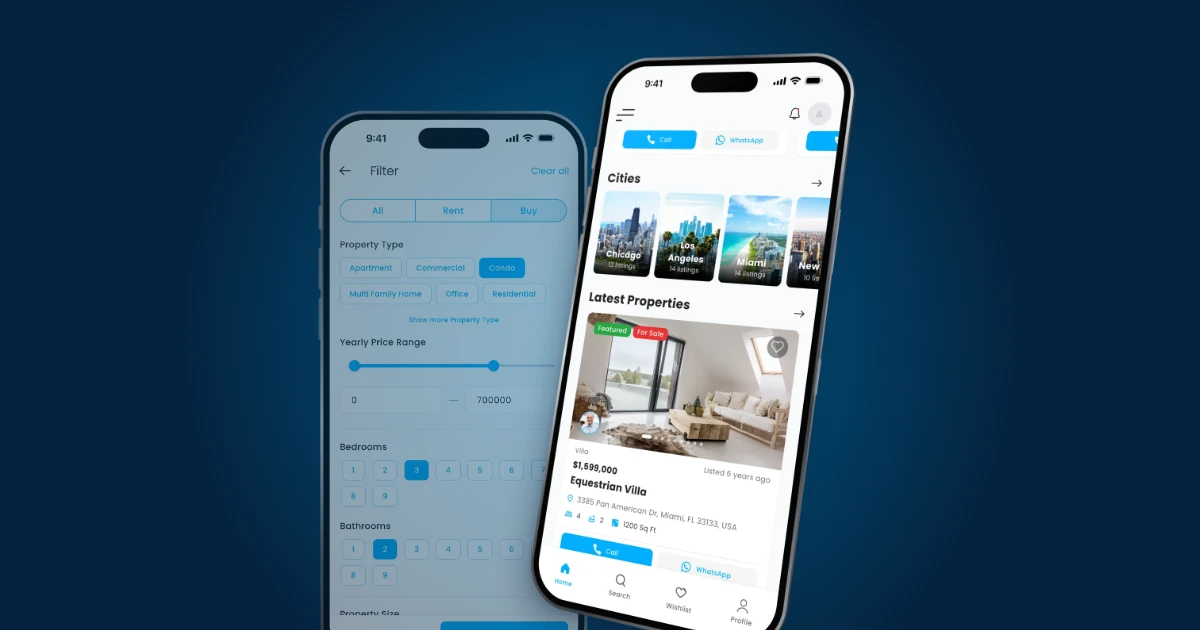
It opens on featured and latest listings, with search one tap away, and a row of cities with photos and a live count of listings in each. Along the bottom are four tabs: Home, Search, Wishlist and Profile.
Only changes to the app itself, such as a new screen or a colour change, need a new build and another store review.
Search and filters
Search uses the filters your site already has: rent or buy, property type, price range, bedrooms and bathrooms. Filter by type, city and price and you're searching the same listings as your website.
Every search result has Call and WhatsApp buttons, so buyers reach an agent without leaving the list. Map search puts listings on a map with price pins, for buyers who search by neighbourhood.
Property details and agents
Each listing page has full-width photos, the price and address, the features you fill in on your site, and a map pin. The agent is one tap away by phone, email or WhatsApp, and there's an enquiry button. Enquiries sent from the app reach your agents through Houzez, the same as the ones from your website.
The agents directory shows your team with ratings, languages, listing counts and a verified badge. Each agent profile adds their licence, service areas and direct contact.
Maps and address autocomplete
The map on property listings comes from Google Maps, and address autocomplete when someone searches comes from Google Places. Both run on a Google Cloud project in your own account.
Google bills Maps and Places per use, but each Maps API includes a free monthly usage allowance, enough that a typical property app costs nothing. The Google Cloud guide covers setup, including a budget alert.
Sign-in with email, Google or Facebook
People sign in to the app with the same account they use on your website, or register a new one from the app. JWT Shield Lite, one of the two plugins on your site, handles the secure login.
Sign in with Google is set up in the same Google Cloud project as the maps. A "Continue with Facebook" button is optional: it raises sign-up rates where Facebook accounts are near-universal, and elsewhere adds a button almost nobody presses. If you're unsure, skip it and add it later; the Facebook guide explains the trade-off.
Wishlist
Buyers can save properties as favourites while they browse and find them again in the Wishlist tab, one of the four tabs along the bottom of the app.
Push notifications
You send push notifications yourself, from your own OneSignal dashboard: write a message, choose who gets it, and send, without asking us. A new listing, a price drop or a reply to an enquiry are the usual reasons. Firebase delivers them to phones.
The OneSignal account and its subscriber list are yours, and both services are free at the volumes an app like this uses. Notifications can't be recalled, so send to yourself first, and most property apps do well with a handful a month. See the OneSignal and Firebase guides.
Crash reporting
Firebase also reports crashes from the app, so problems get fixed that you'd otherwise never hear about. Google Analytics in Firebase is optional; turning it on costs nothing and gives you basic usage figures.
Languages and right-to-left
Each app is published in one language. That can be any language your site is in, left-to-right or right-to-left, with proper Arabic and Kurdish layouts.
Non-Latin scripts need a font that covers them. We can suggest one or use your licensed brand typeface, and for Kurdish we pick one with the full Sorani character set.
If your site is multilingual, the app asks it for content in the language you chose. Make sure property types, cities, statuses and features are translated in WordPress. Property titles and descriptions appear in whichever language each listing was written in.
Your branding
The app name, icon, colours, splash screen and store listing are all your company's, and your clients never see our name. Your primary brand colour drives buttons, links and highlights throughout the app, and your logo sits in the header.
We produce the store screenshots from the finished app once you've approved it in testing. The app is published under your own Apple and Google developer accounts. The brand guide lists every asset.
Account deletion inside the app
Users can delete their account from inside the app, in the Profile tab, and the deletion is immediate. Apple requires apps that let people create an account to also let them delete it from within the app, so this is built in. Anyone who can no longer sign in can still request deletion by email.
Key facts
- Listings, agents, cities and enquiries are read live from your Houzez site, so content changes need no new build or store review.
- Search filters cover rent or buy, property type, price range, bedrooms and bathrooms, and map search shows listings with price pins.
- Listing pages have photos, features, a map pin, an enquiry button and the agent by phone, email or WhatsApp.
- Users sign in with email or Google, and a Facebook button is optional.
- You send push notifications from your own OneSignal dashboard; Firebase delivers them and reports crashes.
- Each app is published in one language, left-to-right or right-to-left, including Arabic and Kurdish.
- Users can delete their account immediately from the Profile tab.
See the real screens in the screen tour, or download the demo app from the App Store or Google Play. The setup guide covers each service above, and pricing is $1,499 for iPhone and Android or $999 for one platform, paid once with the first year of updates included.